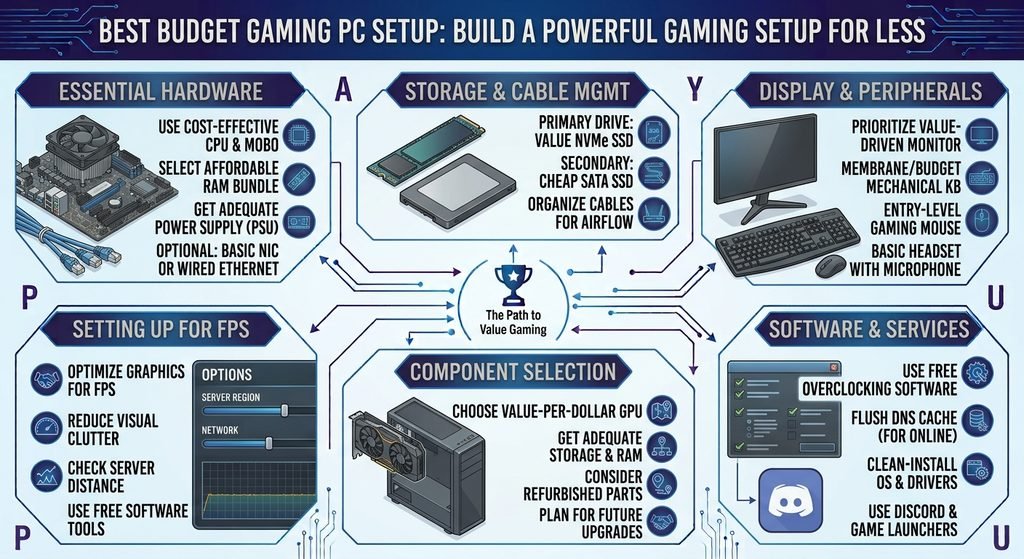
Best Budget Gaming PC Setup: Build a Powerful Gaming Setup for Less
Building a gaming PC does not always mean spending thousands of dollars on expensive hardware. With the right components, careful planning, and a focus on performance rather than unnecessary extras, you can create a powerful budget gaming PC setup that delivers an excellent gaming experience without breaking the bank.
A good budget setup should provide enough performance for the games you enjoy while leaving room for future upgrades. Instead of spending most of your money on one premium component, it is usually smarter to create a balanced system where the processor, graphics card, memory, storage, power supply, and other components work well together.
In this guide, we will explain how to build a budget gaming PC setup, what components matter most, where you can save money, and how to create a gaming environment that looks and performs great without unnecessary spending.
1. Set a Realistic Gaming PC Budget
The first step in building a budget gaming PC is deciding exactly how much you want to spend. Your budget should include more than just the computer itself if you also need a monitor, keyboard, mouse, headset, speakers, or other accessories.
Creating a clear budget helps you avoid spending too much on unnecessary features. For example, a gamer focused on competitive 1080p gaming may not need an expensive 4K monitor or premium processor. On the other hand, someone who wants to play demanding games at higher resolutions may need to allocate more money toward the graphics card.
A realistic budget allows you to prioritize the components that have the biggest impact on gaming performance while keeping the overall setup affordable.
2. Choose the Right Processor
The CPU is one of the most important components in a gaming PC. It handles game logic, background processes, physics calculations, and communication between different parts of the system.
For a budget build, you do not necessarily need the newest or most expensive processor. A modern mid-range CPU can provide excellent gaming performance while leaving more of your budget available for the graphics card.
When choosing a processor, consider the games you play and the performance you actually need. Competitive games that target very high frame rates can benefit from stronger CPU performance, while many single-player games place more emphasis on the GPU.
The key is balance. Avoid pairing an extremely expensive CPU with a weak graphics card simply because the processor has impressive specifications.
3. Prioritize the Graphics Card
For most gaming PCs, the graphics card deserves a significant portion of the budget. The GPU is responsible for rendering game visuals, including textures, lighting, shadows, effects, and resolution.
If gaming performance is your primary goal, spending more of your available budget on the graphics card can often provide better results than buying an unnecessarily powerful processor.
Before purchasing a GPU, think about your target resolution and frame rate. A budget graphics card may be perfectly suitable for 1080p gaming, while higher-resolution gaming may require considerably more graphics performance.
You should also consider the games you plan to play. Competitive games may run smoothly on affordable hardware, while graphically demanding modern titles may require a stronger GPU.
4. Get Enough RAM
RAM allows your computer to temporarily store data that applications and games are actively using. Having enough memory helps your system handle games and background applications smoothly.
For a modern budget gaming PC, having a reasonable amount of RAM is important. Rather than spending heavily on extremely fast or excessive memory, focus first on having enough capacity for your games and everyday applications.
Using two compatible memory modules can also allow the system to take advantage of dual-channel memory configurations, depending on the platform. This can improve overall memory performance compared with certain single-module configurations.
When purchasing RAM, always check motherboard compatibility, supported memory speeds, and the maximum capacity supported by your system.
5. Choose an SSD Instead of an Old Hard Drive
Storage has a major effect on how quickly your PC starts, applications launch, and games load. Traditional hard drives can provide large amounts of storage at a low price, but solid-state drives are generally much faster and more responsive.
For a budget gaming setup, an SSD is one of the upgrades worth prioritizing. Even an affordable SSD can make Windows feel significantly more responsive compared with an older mechanical hard drive.
You can start with a reasonably sized SSD for your operating system and favorite games and add additional storage later when your budget allows.
If you have a large game library, combining an SSD with additional affordable storage can be a practical way to balance speed and capacity.
6. Select a Reliable Motherboard
The motherboard connects the major components of your PC together. Although it does not directly produce gaming performance like the GPU, choosing the correct motherboard is important for compatibility and future upgrades.
A budget motherboard should provide the features you actually need without charging extra for features you will never use. Check that it supports your selected processor, memory, storage, and other components.
You should also consider the number of USB ports, storage connections, expansion slots, networking features, and future upgrade options.
A simple motherboard from a reliable manufacturer can be an excellent choice for a budget build.
7. Do Not Overspend on RGB Lighting
RGB lighting can make a gaming setup look attractive, but it does not improve gaming performance. If your budget is limited, spending money on lighting should come after essential hardware.
Instead of buying expensive RGB components, you can start with a clean-looking case and add lighting later if you want to personalize your setup.
Many budget gaming PCs can look impressive through good cable management, a well-designed case, and simple lighting without spending a large amount of money on decorative accessories.
Remember that your primary goal should be gaming performance and reliability.
8. Choose a Quality Power Supply
The power supply is one component where you should avoid cutting corners. A cheap, low-quality PSU can create reliability problems and may put your expensive hardware at risk.
Choose a power supply from a reputable manufacturer with sufficient capacity for your components. You do not necessarily need a massive wattage rating, but you should have enough headroom for your system and possible future upgrades.
Look at efficiency ratings, protections, warranty coverage, and reviews when selecting a PSU.
Saving a small amount of money on the power supply is not worth compromising the stability of your entire gaming PC.
9. Pick an Affordable Gaming Case
Your PC case protects the internal components and affects airflow, noise, appearance, and upgradeability. Fortunately, you do not need an expensive case to build a good gaming computer.
Look for a case with reasonable airflow, enough space for your graphics card, suitable CPU cooler clearance, and convenient cable-management options.
A case with multiple fan positions can also help maintain good temperatures. You do not need a premium designer case to achieve good cooling.
Choose a case that provides the features you actually need rather than paying extra for unnecessary materials or decorative features.
10. Use the Stock Cooler or an Affordable CPU Cooler
Depending on the processor you choose, a stock CPU cooler may be included and can be sufficient for basic gaming use. If your processor does not include a cooler, an affordable aftermarket option can provide good cooling without requiring a large investment.
Good cooling helps your CPU maintain stable performance during demanding workloads. However, you do not necessarily need an expensive liquid cooling system for a budget gaming PC.
A reasonably priced air cooler can provide excellent performance for many budget and mid-range processors.
11. Choose a 1080p Gaming Monitor
One of the easiest ways to control your gaming setup budget is to choose a monitor that matches your hardware.
For many budget gaming PCs, 1080p remains an excellent target. A good 1080p monitor can provide sharp visuals while requiring significantly less GPU power than higher resolutions.
If you play competitive games, prioritize features such as a high refresh rate and low response time. If you primarily enjoy story-driven games, you may prefer better image quality and color reproduction.
There is no reason to buy an expensive high-resolution monitor if your graphics card cannot comfortably deliver the performance needed to take advantage of it.
12. Buy a Budget Gaming Keyboard and Mouse
A gaming keyboard and mouse do not need to cost a fortune. Many affordable peripherals provide reliable performance and comfortable designs.
For competitive games, a responsive mouse with a comfortable shape can be more important than flashy features. Similarly, a basic mechanical keyboard can provide a satisfying typing and gaming experience without requiring a premium price.
Start with reliable equipment and upgrade later if you discover that you need specific features.
Your peripherals should fit your gaming style and hand comfort rather than simply being the most expensive products available.
13. Consider a Gaming Headset
A headset can be especially useful for multiplayer gaming because it allows you to hear important sounds and communicate with teammates.
You do not need an expensive audiophile setup to enjoy good gaming audio. An affordable headset with clear sound, a decent microphone, and comfortable ear cushions can provide everything a casual or competitive gamer needs.
If you already own good headphones, you may not need to purchase a separate gaming headset immediately. You can use your existing equipment and upgrade later.
14. Improve Airflow for Better Performance
Good airflow is important for keeping your gaming PC at reasonable temperatures. When components become excessively hot, they may reduce their performance to control temperatures.
Place intake and exhaust fans strategically so that fresh air can enter the case while warm air leaves it. Keep dust filters and vents clean, and avoid blocking the case’s airflow.
You do not necessarily need numerous expensive fans. A simple, well-planned airflow setup can provide excellent results.
Proper airflow can also help your components maintain consistent performance during long gaming sessions.
15. Save Money by Reusing Existing Accessories
One of the best ways to reduce the total cost of a gaming setup is to reuse hardware you already own.
If you already have a monitor, keyboard, mouse, speakers, headset, or desk, there is no reason to replace everything at the same time.
Put most of your budget toward the PC components that actually need upgrading. Later, you can gradually improve individual accessories.
Building a gaming setup does not have to happen all at once. A gradual upgrade strategy can make high-quality gaming much more affordable.
16. Consider Used or Previous-Generation Hardware
Buying previous-generation hardware can sometimes provide excellent value. Newer components are not always dramatically better for every type of gaming, and older hardware may still deliver strong performance.
If you consider used components, inspect their condition carefully and buy from trustworthy sellers whenever possible. Graphics cards, processors, memory, and other components can sometimes be found at attractive prices on the second-hand market.
However, be cautious about extremely cheap deals. Check the product’s condition, compatibility, warranty status, and history before purchasing.
A good deal is valuable only when the hardware is reliable.
17. Build the PC Yourself
Building your own gaming PC can reduce costs because you are not paying someone else to assemble the system. It also gives you a better understanding of your hardware.
The process involves installing the CPU, memory, storage, motherboard, power supply, graphics card, cooling system, and other components.
Although the process may seem complicated at first, PC components are designed to fit together in specific ways. Following reliable instructions and checking compatibility before installation can make the process much easier.
Building your own computer also makes future upgrades simpler because you become familiar with the internal components.
18. Optimize Windows and Game Settings
You can improve gaming performance without spending any additional money by optimizing your software settings.
Keep your operating system and graphics drivers updated, close unnecessary background applications, and adjust in-game graphics settings according to your hardware.
If you experience low FPS, reducing demanding settings such as shadows, reflections, volumetric effects, and certain post-processing features can provide a noticeable performance improvement.
Do not automatically set every game to its highest graphics preset. A balanced combination of visual quality and frame rate often produces a better gaming experience.
19. Plan for Future Upgrades
A good budget gaming PC should not only perform well today; it should also give you options for tomorrow.
Choose components that allow future upgrades where practical. For example, a motherboard with additional memory slots or storage connections can make future expansion easier.
You may initially build a system designed for 1080p gaming and later upgrade the graphics card when your budget allows.
Planning ahead can help you avoid replacing the entire computer when only one or two components need improvement.
20. Focus on Performance Instead of Appearance
A gaming setup can look impressive without expensive decorations. Performance should always come before aesthetics when you are working with a limited budget.
Prioritize the graphics card, processor, RAM, SSD, power supply, and monitor before spending money on premium cases, RGB accessories, decorative items, or expensive desk accessories.
Once the core setup is performing well, you can gradually add aesthetic improvements.
The best budget gaming setup is not the one with the most lights. It is the one that delivers a smooth, enjoyable gaming experience for the money you spend.
Example of a Budget Gaming Setup
A practical budget gaming setup can include:
- A modern budget or mid-range processor
- A capable graphics card for 1080p gaming
- Sufficient dual-channel RAM
- A fast SSD for Windows and games
- A reliable compatible motherboard
- A quality power supply
- An airflow-focused PC case
- A 1080p high-refresh-rate monitor
- An affordable gaming mouse
- A comfortable keyboard
- A gaming headset
- A basic desk with good cable management
The exact components should depend on current prices, availability, the games you play, and your target resolution. The important principle is to create a balanced system rather than spending too much on one component.
Final Thoughts
Building the best budget gaming PC setup is all about making smart decisions. You do not need the most expensive graphics card, processor, monitor, or accessories to enjoy modern PC gaming. By setting a realistic budget, prioritizing the GPU, choosing enough RAM and fast storage, using a reliable power supply, and avoiding unnecessary upgrades, you can create a powerful system for considerably less money.
The best strategy is to focus on the gaming experience you actually want. If 1080p gaming is your target, build around that goal instead of paying for hardware designed for resolutions you do not need. Reuse existing accessories when possible, consider good-value previous-generation components, and plan future upgrades carefully.
With the right approach, a budget gaming PC can provide smooth performance, fast loading times, and an enjoyable gaming experience while leaving room for future improvements.