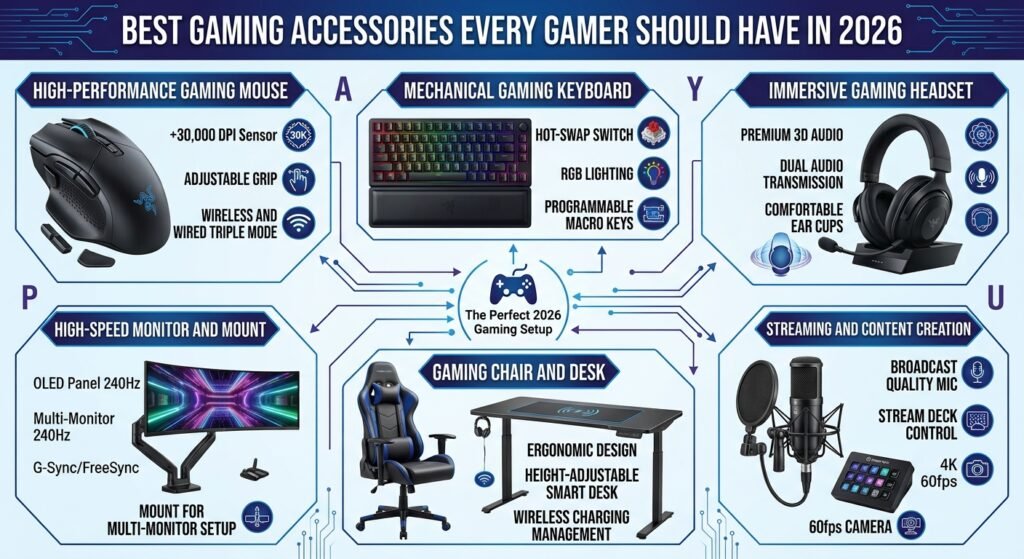
Best Gaming Accessories Every Gamer Should Have in 2026
Gaming in 2026 is more immersive, competitive, and technology-driven than ever before. While having a powerful gaming PC or console is important, the right accessories can make an equally significant difference. A good gaming accessory can improve comfort, accuracy, sound quality, communication, performance, and even the overall appearance of your gaming setup.
Whether you are a casual gamer who plays a few hours a week or a competitive player who spends several hours every day gaming, choosing the right equipment can help you get more from every session. From responsive gaming mice and mechanical keyboards to high-quality headsets and ergonomic chairs, there are many accessories worth considering.
In this guide, we will explore the best gaming accessories every gamer should have in 2026, explain why they matter, and discuss what you should look for before buying them.
1. Gaming Mouse
A gaming mouse is one of the most important accessories for any PC gamer. A regular office mouse can perform basic tasks, but a dedicated gaming mouse is designed to provide better precision, faster response times, customizable buttons, and improved comfort during long gaming sessions. These features can be especially useful in competitive games where accurate aiming and quick reactions can determine the outcome of a match.
Modern gaming mice come with adjustable DPI settings, lightweight designs, programmable buttons, and advanced sensors. Players who enjoy first-person shooters may prefer a lightweight mouse with a precise sensor, while MMO or strategy players may benefit from additional programmable buttons. Wireless gaming mice have also become increasingly popular because modern wireless technology can provide responsive performance without the cable getting in the way.
When choosing a gaming mouse, consider its shape, weight, sensor quality, DPI range, button layout, and connection type. The best gaming mouse is not necessarily the one with the highest specifications; it is the one that feels comfortable and matches your gaming style.
2. Mechanical Gaming Keyboard
A mechanical gaming keyboard is another essential accessory for serious gamers. Unlike traditional membrane keyboards, mechanical keyboards use individual mechanical switches underneath the keys. These switches can provide a more responsive and satisfying typing and gaming experience.
Mechanical keyboards are available with different types of switches, each offering a different feel. Some switches are designed for fast and quiet inputs, while others provide noticeable tactile feedback or a louder clicking sound. Gamers can choose a switch type based on personal preference and the types of games they play.
Many gaming keyboards also include customizable RGB lighting, programmable keys, dedicated media controls, and software that allows users to create macros. Features such as anti-ghosting and N-key rollover can also help ensure that multiple key presses are registered correctly during fast-paced gameplay.
For gamers who spend significant time playing PC games, a quality mechanical keyboard can improve both comfort and responsiveness.
3. Gaming Headset
Sound is an important part of modern gaming. A high-quality gaming headset allows players to hear footsteps, environmental sounds, dialogue, music, and other important audio details more clearly. In competitive games, directional audio can sometimes provide valuable information about where another player is located.
Gaming headsets usually combine headphones with an integrated microphone, making them convenient for multiplayer gaming. Many models offer surround or spatial audio features that create a more immersive sound experience. Wireless gaming headsets are also becoming increasingly popular because they provide greater freedom of movement.
When choosing a headset, pay attention to sound quality, microphone performance, comfort, battery life for wireless models, and compatibility with your gaming platform. A comfortable headset with good audio can make long gaming sessions much more enjoyable.
4. Large Gaming Mouse Pad
A gaming mouse pad might look like a simple accessory, but it can significantly improve mouse control. A larger surface gives gamers more room to move their mouse, which is particularly useful for players who use lower sensitivity settings.
Gaming mouse pads are available in different sizes and surface materials. Soft cloth mouse pads are popular because they are comfortable and easy to transport, while hard surfaces can provide a faster and smoother mouse movement. Extended mouse pads are large enough to accommodate both a keyboard and a mouse, helping create a cleaner and more organized desk.
A quality mouse pad should provide consistent tracking and remain stable while you are gaming. Look for a non-slip rubber base and durable edges if you want an accessory that can withstand years of regular use.
5. Gaming Monitor
Although a gaming monitor is technically part of your main gaming hardware, it is one of the most valuable components of a complete gaming setup. A high-quality monitor can make games look smoother, more detailed, and more responsive.
Important specifications include refresh rate, response time, resolution, panel type, adaptive sync support, and screen size. Competitive gamers often prioritize high refresh rates and low response times because smoother motion can make fast-paced gameplay feel more responsive. Players who prioritize visual quality may prefer a higher-resolution display with excellent color reproduction.
In 2026, gamers have more monitor choices than ever, ranging from affordable high-refresh-rate displays to premium high-resolution models. Before buying a monitor, consider your GPU or console capabilities. There is little benefit in buying an extremely high-refresh-rate monitor if your system cannot consistently produce enough frames to take advantage of it.
6. Gaming Controller
Even PC gamers can benefit from having a gaming controller available. Some games are simply more comfortable to play with a controller, especially racing games, sports games, fighting games, and certain action-adventure titles.
Modern controllers may include responsive triggers, customizable buttons, vibration feedback, wireless connectivity, and ergonomic designs. Some premium controllers also allow players to adjust button layouts and sensitivity settings.
Having both a keyboard and mouse and a controller gives gamers more flexibility. You can choose the control method that works best for each game instead of being limited to one setup.
7. Gaming Chair
Comfort should never be overlooked when building a gaming setup. A gaming chair can provide better support for your back, neck, and arms during extended gaming sessions. Sitting in an uncomfortable chair for hours can make gaming less enjoyable and may contribute to general discomfort.
When choosing a gaming chair, look for adjustable height, supportive back design, comfortable cushioning, adjustable armrests, and a stable base. A chair does not need to have an expensive racing-style design to be useful. In many cases, an ergonomic office chair can be an excellent alternative.
The most important factor is proper support and adjustability. A chair that allows you to maintain a comfortable sitting position can make a major difference during long gaming sessions.
8. Gaming Microphone
While many gaming headsets include microphones, dedicated gaming microphones can provide better voice quality. This can be especially useful for streamers, content creators, podcasters, or gamers who regularly communicate with teammates.
A dedicated microphone can make your voice clearer and easier for other players to understand. Many models include adjustable stands, mute buttons, gain controls, and software features for improving audio quality.
If you regularly use voice chat or create gaming content, upgrading from a basic headset microphone to a dedicated microphone can be a worthwhile improvement. However, casual players may find that a good gaming headset microphone is more than sufficient.
9. Gaming Speakers
Not every gaming session requires headphones. Gaming speakers can provide an enjoyable audio experience when you want to play without wearing a headset. A quality speaker system can deliver richer sound and make games, movies, and music more enjoyable.
Compact desktop speakers are suitable for smaller gaming desks, while larger speaker systems can provide a more powerful audio experience. Some gaming speakers also include RGB lighting and software controls.
Speakers are particularly useful for single-player games where communication with teammates is not necessary. However, headphones are generally better for competitive multiplayer gaming because they provide more precise directional audio and reduce sound leakage.
10. Gaming Desk
A good gaming desk provides the foundation for your entire setup. It gives you enough space for your monitor, keyboard, mouse, speakers, and other accessories while helping keep everything organized.
When choosing a gaming desk, consider its width, depth, height, construction quality, cable-management options, and available storage. A larger desk can provide more flexibility, but the ideal size depends on the space available in your room.
Some modern gaming desks include built-in cable-management channels, headphone hooks, monitor stands, and other useful features. Keeping your gaming desk organized can improve both the appearance and functionality of your setup.
11. Monitor Arm
A monitor arm is a simple accessory that can make your gaming desk more flexible. Instead of keeping your monitor on its original stand, a monitor arm allows you to adjust its height, angle, and viewing distance.
This can help create a cleaner desk and provide more space underneath the monitor. Some monitor arms also support multiple displays, making them useful for streamers, content creators, and gamers who use multiple screens.
Before purchasing one, check the monitor’s weight and mounting compatibility. A properly installed monitor arm should securely support the display and allow smooth adjustments.
12. RGB Lighting
RGB lighting has become a popular part of gaming setups. While it does not directly improve gaming performance, it can dramatically change the atmosphere of a gaming room and make a setup look more personalized.
RGB lighting can be added through keyboards, mice, mouse pads, LED strips, monitor lights, and desktop accessories. Many products allow users to synchronize lighting effects across multiple devices.
The key is to avoid excessive lighting that becomes distracting. A well-planned lighting setup can create an immersive gaming environment without making the room uncomfortable or overly bright.
13. USB Hub
Modern gaming setups often require multiple USB connections for keyboards, mice, headsets, microphones, controllers, webcams, and other devices. A USB hub can make managing these connections much easier.
Instead of constantly reaching behind your computer to connect or disconnect devices, a USB hub gives you additional ports in an accessible location. Some hubs also provide faster data-transfer speeds or additional charging capabilities.
When choosing a USB hub, check the number and type of ports, transfer speeds, power requirements, and compatibility with your computer.
14. Gaming Capture Card
A capture card is an important accessory for gamers who stream or record gameplay from consoles or another PC. It captures video and audio from the gaming device and sends that information to another computer for streaming or recording.
Capture cards are available in different resolutions and refresh rates. If you plan to create high-quality gaming content, choose a model that supports the resolution and refresh rate you intend to use.
For casual gamers, a capture card may not be necessary. But for streamers and content creators, it can become an essential part of the gaming setup.
15. Cable Management Accessories
A gaming setup can quickly become messy when multiple devices are connected. Keyboard cables, mouse cables, monitor cables, power cords, and USB connections can create a confusing collection of wires.
Cable-management accessories such as clips, sleeves, ties, channels, and under-desk trays can help keep everything organized. A clean cable setup not only looks better but can also make it easier to troubleshoot or replace equipment.
You do not need to spend much money on cable management. Even simple cable ties and adhesive clips can make a noticeable difference.
How to Choose the Best Gaming Accessories in 2026
Choosing gaming accessories should always start with your personal needs rather than trends. Before buying anything, think about the games you play, your gaming platform, your available desk space, and your budget.
Competitive FPS players may want to prioritize a precise gaming mouse, high-refresh-rate monitor, mechanical keyboard, and quality headset. Streamers may benefit more from a dedicated microphone, webcam, capture card, and monitor arm. Casual gamers can focus on comfortable and reliable accessories without spending money on premium features they may never use.
It is also important to check compatibility. Some accessories are designed specifically for PC, PlayStation, Xbox, or other platforms. Always confirm compatibility before purchasing.
Final Thoughts
The best gaming accessories every gamer should have in 2026 depend on how you play and what you want from your gaming setup. You do not need to purchase everything at once. Start with the accessories that provide the biggest improvement to your gaming experience and upgrade gradually.
A quality gaming mouse and keyboard can improve control, a good headset can enhance audio and communication, and an ergonomic chair can improve comfort. Meanwhile, accessories such as monitor arms, RGB lighting, USB hubs, capture cards, and cable-management tools can make your entire setup more organized and enjoyable.
The goal is not to build the most expensive gaming setup possible. Instead, focus on creating a setup that is comfortable, responsive, organized, and suited to your gaming style. With the right accessories, even a simple gaming station can become a powerful and enjoyable gaming environment in 2026.